WideCast × ChatGPT & Codex — easy setup
Pick your surface below.
ChatGPT Apps ⭐ recommended — the future of ChatGPT
Apps make WideCast available in every regular chat. Type "@WideCast …" or just describe what you want — ChatGPT routes to WideCast automatically. Available on Plus / Pro / Business / Enterprise / Edu on Web and Desktop. Requires Developer mode.
1Get your connect-link
Get your connect-link from widecast.ai/#setup.
2Enable Developer mode
In ChatGPT: Settings → Apps → Advanced settings → Developer mode → turn ON. A + Create app button appears.
3Create the WideCast App
Click + Create app. Fill in:
- Connector name →
WideCast - Description →
Make short-form videos from any topic, news event, or idea. - Connector URL → paste your connect-link from Step 1
- Authentication → No Authentication
Save. The app shows under Drafts.
4Make a video — just ask
Open any regular chat and prompt:
Use WideCast to make a video about 5 things to do right after a car accident.
If ChatGPT doesn't auto-route, prefix with @WideCast.
ChatGPT Custom GPT single-GPT alternative
Keeps WideCast inside a dedicated GPT you open by name. Works on Web, Desktop, and Mobile (Mobile is the only surface that doesn't support Apps yet — use this path there). Requires ChatGPT Plus or higher.
1Start a new GPT
In ChatGPT: Explore GPTs → + Create → Configure tab. Fill in Name = WideCast. Skip the other fields.
2Add the WideCast Action
Scroll to the bottom of Configure → click + Create new action.
Under Schema → Import from URL, paste:
Click Import, then click Authentication. Fill in as in the screenshot:
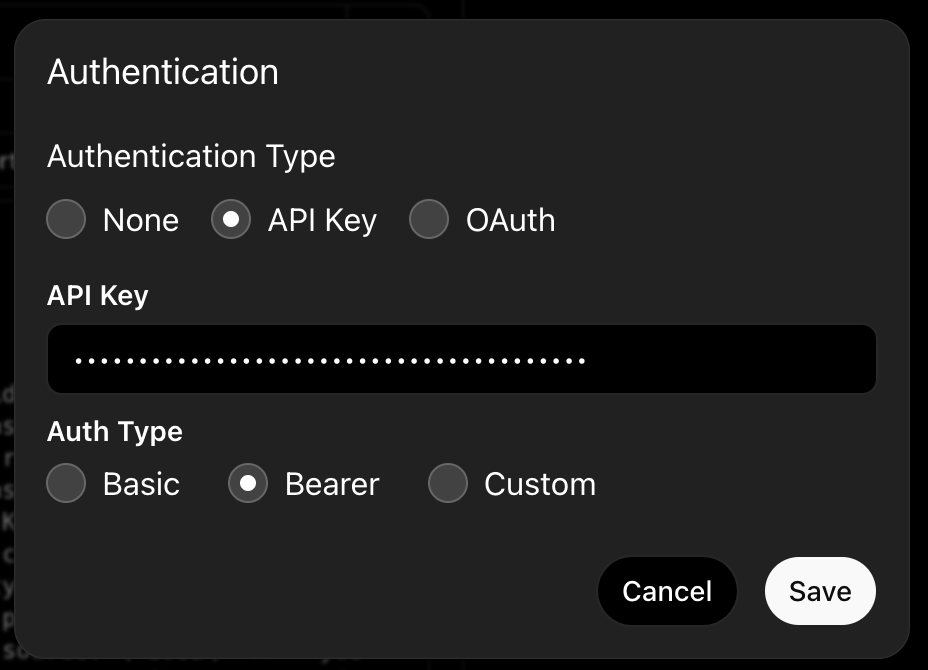
- Authentication Type → API Key
- API Key → your
wc_live_key from widecast.ai/#setup - Auth Type → Bearer
Click Save, then the back arrow.
3Save the GPT — keep "Only me"
Top-right: Create. In the Share GPT dialog, keep Only me:
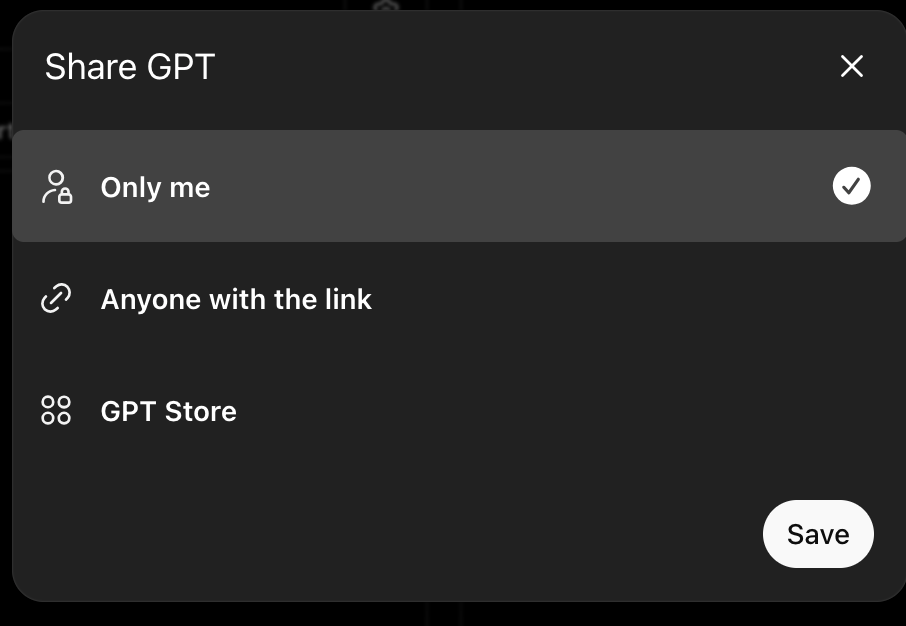
⚠ Don't share the GPT. Your API key is inside the Action — anyone with the link can spend your credits.
Click Save. Find it under My GPTs.
4Make a video — just ask
Open your WideCast GPT and prompt:
Use WideCast to make a video about 5 things to do right after a car accident.
OpenAI Codex app
1Get your connect-link
Get your connect-link from widecast.ai/#setup.
2Add WideCast in Codex
In Codex: Settings → MCP Servers → Add. Name = widecast_mcp, pick Streamable HTTP:
- URL → paste your connect-link verbatim
- Bearer token env var → leave empty
- Headers → leave empty
Save.
3Make a video — just ask
Use WideCast to make a video about 5 things to do right after a car accident.